Build a company dashboard with AI: Lovable vs. Claude, tested on the same data
I gave both tools the same messy CRM export and the same written spec, then checked every number they showed. Both dashboards are below, live. So are the prompts, the dataset and what each tool got wrong.
AEAhmed Essam, CRM consultant, 90+ CRM buildsPublished 11 October 2026 · 19 min read
Most "build a dashboard with AI" posts end at a screenshot. The chart looks right, nobody checks the totals, and the reader never sees the second week, when a fresh export lands and the numbers have to update on their own.
So I ran a real test. One fictional B2B company, 626 deals over 15 months, with 18 data errors planted on purpose. One written spec of 657 words, the way a sales leader would write it. That spec went to Lovable and to Claude without changes. Then a fresh export went to both, a separate AI reviewer tried to break both, and each tool got 1 prompt to fix what the reviewer found.
The short version
Both tools got every headline number right on the first prompt. Won revenue, win rate, deal size, sales cycle, pipeline and stalled deals all matched my own calculation to the euro. The difference is not accuracy. It is where the result lives and how much checking the tool does on its own.
Pick Lovable ifyou want a link your team can open today and nobody on the team will ever open a terminal. You pay in credits, and the app lives on its hosting (the code is yours and syncs to GitHub on every plan).
Pick Claude ifyou want one file you own, can host anywhere and can open in 5 years. You pay with your plan's usage and with a bit more patience.
How to do it yourself, in 4 steps:
Write a spec with your KPIs, date rules and cleanup rules (mine is below).
Calculate 3 numbers yourself from the export: won revenue, win rate, open pipeline.
Send prompt 1 with the spec, the CSV and "check these numbers with a separate calculation".
Try to break the result, then send 1 fix prompt with everything you found.
Where they differed was behaviour: a reset button that kept the search, an export that mislabelled 113 deals, tables cut off on a laptop. Lovable shipped 5 medium-rated problems, Claude 1. One fix prompt each closed almost all of them, without changing a single number. Neither replaces your CRM's reports when you need live data for 20 people with permissions. For a Monday pipeline review from an export, both are good enough today.
3 each
prompts per tool: build, data refresh, fix round
12 min
Lovable agent time, all 3 prompts
38 min
Claude agent time, all 3 prompts
14.6
Lovable credits, about $4.40 at top-up price
01Click both dashboards first
Both run on the same dummy data: Quellwerk Software, a fictional company with 8 reps, snapshot date 30 September 2026. Change the period, pick a rep, click a bar and the deal list below filters to those deals. Try to break them. Use the keyboard.
Option 1 is Lovable's source, moved into a plain Vite wrapper so it runs as one offline file: fonts embedded, Lovable's router and page head removed, no dashboard logic changed. The original runs on Lovable's hosting: open the live Lovable app. Option 2 is the file Claude wrote, unchanged: open it as a full page.
They look alike because the spec fixed the colours, the fonts, the sections and the rules. That was the point: same input, as far as I could make it. The one place where the input was not identical is explained in the next section.
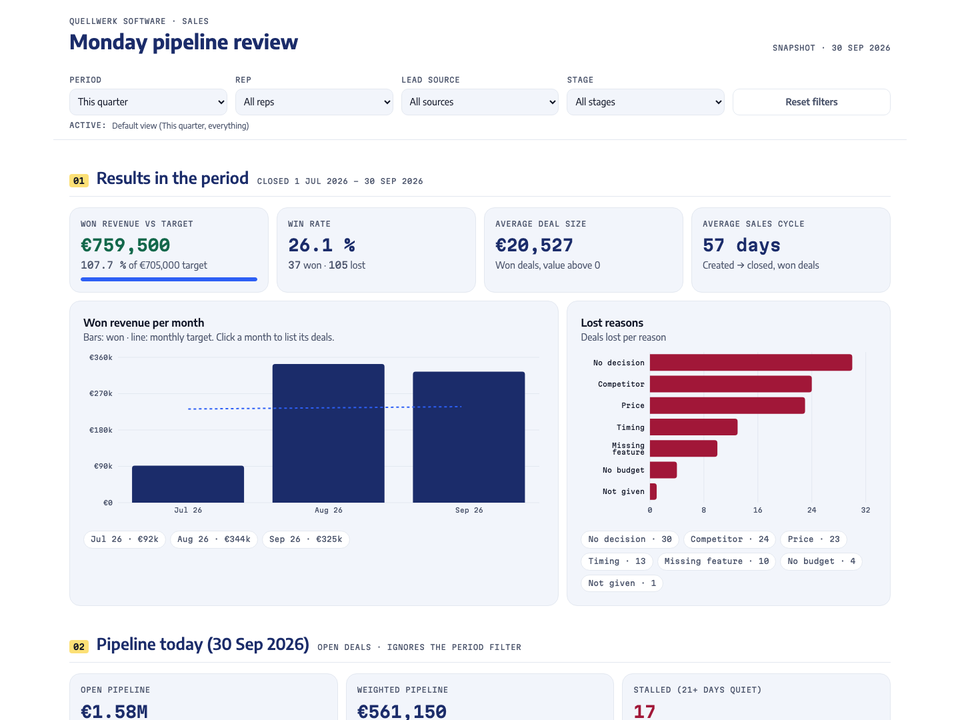
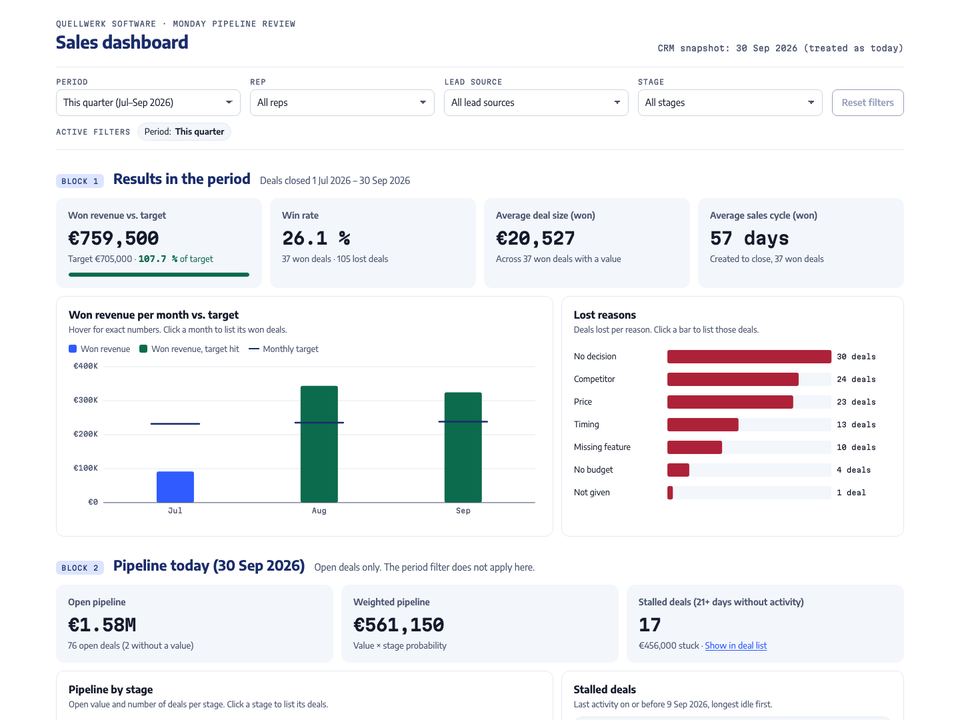
Lovable left, Claude right, "This quarter". Same 4 numbers. Claude used the spec's green for months that hit target, which Lovable did not, so the miss in July (€91,500 against a €232,000 target) stands out without reading the axis.
02How the test worked
The rule was simple. Whatever I gave one tool, the other got too, word for word. I wrote the spec once and pasted it into both first prompts. Only the lines about the technology and the self-test differ, because Lovable builds web apps and Claude was asked for a single file. One of those differences matters: I asked Claude to check its work in a browser at 1440 and 390 px; Lovable's prompt only said "test it in the browser" (the spec asked both for a 390 px phone layout). Some of Claude's stricter testing comes from that line, and Lovable's laptop-width bug sat at a width only Claude was told to check.
Claude ran as Claude Code with the Opus 5.5 model on my Mac, where a headless Chrome and a browser-test library were already installed. On a fresh setup, let it install a test browser first, or its browser checks will not run. Lovable ran in my own Lovable Pro workspace with my own credits. I did not measure how much of a Claude plan's usage window 38 minutes of agent time uses.
1 dataset, 1 spec, 2 tools, 1 check. The reference numbers come from a separate script that neither tool saw.
The data: a CRM export with real mess in it
I generated the dataset with a seeded script, so it is reproducible and contains no real company. It covers deals created from July 2025 to September 2026, with monthly targets for the last 12 months. Then I broke it on purpose, the way every CRM export I have opened is broken:
Planted error
Deals
Rule written in the spec
Duplicate deals, one with a trailing space in the account name
3
Count once
No owner
4
Show as "Unassigned"
No lead source
3
Show as "Unknown"
No deal value
2
Leave out of sums, still count the deal
Won deal with value 0
1
Leave out of average deal size
Close date before created date
1
Leave out of the sales cycle
Lost deal without a reason
2
Show as "Not given"
Stage written "closed won" in lower case
2
Treat as "Closed Won"
18 planted errors in 626 rows. Both tools applied every rule. Claude listed all 18 by deal ID in its data quality panel; Lovable listed 16 and handled the 2 lost deals without a reason silently, until the fix round.
Writing the cleanup rules into the prompt is the step most people skip. Without them, each tool guesses, and 2 honest guesses give 2 different win rates from the same file. With them, both tools landed on the same numbers to the euro.
My own mistake, caught by the numbers
My first dataset started in October 2025 with no older deals. The reference calculation showed October at 10 % of target and November at 31 %, as if the company had just been founded. I added 3 warm-up months and gave both tools the new file as a "fresh export". That accident became the best test in the whole run: does the dashboard update when the data changes?
03The 10 numbers on the board, and why these
A sales leader on a Monday wants 5 answers: are we on target, where is the pipeline, which deals are stuck, who needs help, which sources pay off. Every number on the board answers one of those. Everything else stayed out.
Number
Definition used
The question it answers
Won revenue vs. target
Won deals closed in the period / sum of monthly targets
Are we on plan?
Win rate
Won / (won + lost), closed in the period
Do we convert what we work on?
Average deal size
Won value / won deals with a value
Are we discounting, or moving up?
Sales cycle
Days from created to closed, won deals
How long until pipeline is revenue?
Open pipeline
Sum of open deal values today
How much is in play?
Weighted pipeline
Value x stage probability
What will probably close?
Pipeline by stage
Value and count per open stage
Where do deals pile up?
Stalled deals
Open, no activity for 21+ days
Which deals are we forgetting?
Rep scorecard
Won, win rate, open pipeline, activities
Who needs help this week?
Lead sources and lost reasons
Won revenue and win rate per source; lost deals per reason
Where to spend, what to fix
Win rate needs its definition in writing. Pipedrive and the win-rate formula in Salesforce Help divide won deals by closed deals (Pipedrive, Salesforce Help). Close's blog divides by all opportunities, open ones included (Close). On this dataset the first gives 26.1 % for the quarter. Counting open deals in the denominator makes the team look worse every time the pipeline grows. I use won / (won + lost) and print it on the dashboard.
The stalled-deal list is the most useful thing on the page. Here it holds 17 open deals worth €456,000 that nobody has touched for 3 weeks or more. In a pipeline meeting, that list is worth more than every chart above it.
04Lovable vs. Claude side by side: time, credits, bugs
Option 1: Lovable
Option 2: Claude
Prompts to a working dashboard
1
1
Prompts in total: build, refresh, fix round
3
3
Agent time, prompt 1
about 7 min
about 18 min
Agent time, data refresh
about 1 min
about 14 min: 1 for the data, the rest re-running its own tests
Agent time, fix round
about 3.5 min
about 6 min
Cost of this build
14.6 credits (9.4 + 1.8 + 3.4)
No per-message price; counts against the plan's usage limits
Lovable, free on all plans; anyone with the link can open it on Free and Pro
Anywhere: a shared drive, your intranet, any static host
Next week's data
Upload the new CSV, 1 prompt, 1 minute
Replace the CSV, 1 prompt; 14 minutes because it re-ran all its tests
Editing without AI
Visual editor plus code
Code only
Best for
A team link today, non-technical owner
A file you own, sensitive data, no running cost
Times from the tools' own timestamps. Credits from Lovable's per-message cost. Hosting facts from docs.lovable.dev, checked 11 October 2026.
2 things surprised me. First, accuracy was a tie. I expected at least one tool to invent a number or miscount the duplicates. With a written spec and cleanup rules, neither did. Second, Claude was slower but stricter. It tested far more: every combination of the 4 filters at 2 screen widths, every sortable column, the CSV export row count, keyboard-only use. Lovable tested less and shipped faster.
05What each one got wrong
Accuracy on the headline numbers is the floor, not the finish. After the data refresh I gave a separate AI review session (Claude Opus, fresh context) only the 2 finished files, the CSVs and the spec, and asked it to break them: combine filters, recompute every number from the CSV, shrink the screen, drop the mouse. It did not see my reasoning or the build logs. For Lovable it tested my offline build of Lovable's code. A Claude model judging a Claude build is a bias risk, so every finding below is one you can reproduce in the demos yourself.
It could not break a single number. The reviewer recomputed every tile for all 4 periods and 15 combined filter states, every chart value, the sums of every table, and the exact IDs of the stalled deals. It even switched the browser's time zone to Los Angeles and to the Pacific island of Kiritimati to catch date bugs. Both dashboards matched to the euro, in Python and again in a separate database query.
What it did find was behaviour and layout: 9 findings for Lovable, 6 for Claude. The tables list all of them.
Option 1: Lovable
What broke
Severity
After the fix prompt
"Reset filters" kept the search text, while the page said "Default view". Showed 1 deal instead of 218.
medium
fixed
Win rate column in "Lead sources" cut off on a laptop screen, with no visible scrollbar
medium
fixed
CSV export wrote lost reason "Not given" on 113 open and won deals
medium
fixed
CSV export garbles umlauts in Excel (no UTF-8 marker); 57 accounts contain "ü"
medium
fixed
With a rep selected, "21.6 % of €705,000 target" compared 1 rep to the whole team's target, without saying so
medium
fixed
Data quality panel missed 2 issue types (lost without a reason, open deals past their close date)
low
fixed
Keyboard focus jumped to the top after "Clear" and "Reset"
low
fixed
Phone: scorecard headers ran together ("WON REVENUEWON"), stage chart labels overlapped
low
partly Labels fixed; scorecard and deal list still need a sideways swipe
Wording: "1 DEALS IN VIEW", "Nothing stalled. Nice." with no open deals at all, a screen-reader label "1 deals lost"
low
partly Plural and empty text fixed; the screen-reader label still says "1 deals"
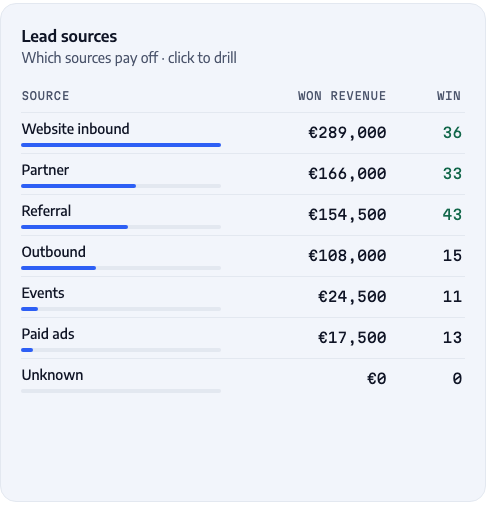
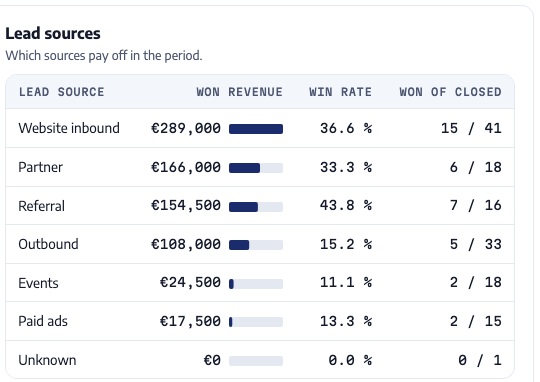
The same table, before the fix round. Left, Lovable: "WIN" and "36" are what is left of "Win rate 36.6 %". Right, Claude: it hit the same overflow in its own screenshot test and fixed it before handing over, by renaming a column and narrowing the bars. Same spec, same bug, different habits.
Option 2: Claude
What broke
Severity
After the fix prompt
Deal list wider than a laptop screen: 14 columns, a date cut mid-text, nothing showing it scrolls sideways
Tap targets too small: sort headers 15 px, "Show in deal list" 19 px
low
fixed
Stalled box showed about 3 of 17 deals before scrolling inside it
low
fixed
Rep and source tables listed rows of zeros under narrow filters
low
partly Hidden for reps; sources with only open deals still show €0
The same HTML id used twice
low
fixed
Both shared 3 small gaps the reviewer flagged but I left alone: search misses "brück" when the umlaut is typed or pasted in decomposed form (as some Mac files store it), the CSV export has no guard against values Excel would run as formulas (none in this data), and a "Closed Won" stage filter shows a win rate of 100 %, which is correct and useless.
The fix round
I sent each tool its own list in one prompt, framed the way you would forward a colleague's notes: "the numbers are correct, these things are broken, fix them as one batch, change nothing else". Then the same reviewer tested the fixed versions. Lovable fixed 7 of its 9 findings fully and 2 partly, for 3.4 credits in about 3.5 minutes.Claude fixed 5 of its 6 fully and 1 partly in about 6 minutes, and created a new problem doing it: on a phone, the deal list became a small box you scroll inside, with about 1 deal visible at a time. Claude's own test had already caught a worse side effect in the same round (the phone cards had removed sorting) and fixed it. No number changed in either dashboard. A second fix prompt would close the rest; I stopped here so you see what 1 round buys you.
Same reading, different manners
I expected the 2 tools to read at least 1 rule differently. They did not. Pick the open stage "Demo" in the Stage filter and both empty the "Results" block, because results only count closed deals, while the pipeline block shows the 19 Demo deals. The difference is what the empty block tells you. Claude writes "No closed deals here" and suggests a longer period or a reset. Lovable shows €0, dashes, "0.0 % of target" and "No won deals in this period", but nothing says why, which in a Monday meeting reads like a bad quarter. Same logic, different manners. If empty states matter to you, ask for the explanation in the spec.
What they did not get wrong
Neither tool invented a number, a column or a deal. Neither wrote "NaN" on the page. Both applied every cleanup rule to every planted error. Both kept the 2 blocks apart as asked: results by close date, pipeline as of today. When I asked for the data refresh with "change nothing else", both changed nothing else in the dashboard.
06The prompts, copy and paste
This is everything I sent, in order. The spec is the long part and the same for both tools. Replace the company, the colours and the date with yours.
The spec (same for both)
dashboard-spec.txt · 657 words
WHO IT IS FOR
I run sales at Quellwerk Software (B2B workflow software, 8 sales reps). Every Monday I review the pipeline with my team. I want one dashboard that answers: are we on target, where is the pipeline, which deals are stuck, who needs help, which lead sources pay off.

THE DATA
- deals.csv: one row per deal. Columns: deal_id, deal_name, account, industry, company_size, owner, lead_source, stage, probability_pct, value_eur, created_date, expected_close_date, close_date, stage_entered_date, last_activity_date, lost_reason, calls, emails, meetings.
- Stages: Qualified, Discovery, Demo, Proposal, Negotiation (open), Closed Won, Closed Lost.
- targets.csv: monthly new-business target in EUR (month, target_eur).
- The data is a snapshot taken on 30 September 2026. Treat that date as "today".

CLEAN THE DATA FIRST (the export is messy, like every CRM export)
- Stage names can differ in upper/lower case: treat "closed won" as "Closed Won".
- Some deals are duplicates: same account (ignore extra spaces), same value, same created date. Count them once.
- Empty owner = "Unassigned". Empty lead source = "Unknown".
- Empty value = leave it out of every sum and average, but still count the deal.
- A won deal with value 0 is left out of average deal size.
- A close date before the created date is a typo: leave that deal out of the sales cycle average.
- Show all of this in a "Data quality" panel: each issue, how many deals, and their deal IDs, so I can fix them in the CRM.

FILTERS (top of the page, every number and chart updates together)
- Period: This quarter (Jul to Sep 2026, default), Last quarter (Apr to Jun 2026), Last 6 months, Last 12 months.
- Rep (all or one), Lead source (all or one), Stage (all or one).
- Show which filters are active and a "Reset filters" button.

TWO BLOCKS, CLEARLY LABELLED
1. "Results in the period" uses closed deals whose close date falls in the selected period:
   - Won revenue vs. target (target = sum of the monthly targets in the period), with % of target.
   - Win rate = won deals / (won + lost deals).
   - Average deal size (won deals).
   - Average sales cycle in days (created date to close date, won deals).
   - Won revenue per month against the monthly target (chart).
   - Lost reasons (chart, deals lost per reason; empty reason = "Not given").
2. "Pipeline today (30 Sep 2026)" uses open deals and ignores the period filter:
   - Open pipeline value and weighted pipeline (value x probability_pct).
   - Pipeline by stage (chart: value and number of deals per stage).
   - Stalled deals: open deals with no activity for 21 days or more before 30 Sep 2026. Count, value, and a list.

TABLES
- Rep scorecard: per rep won revenue, deals won, win rate, open pipeline, activities (calls + emails + meetings on the rep's deals in view, meaning deals closed in the period plus open deals).
- Lead sources: per source won revenue and win rate.
- Deal list: all deals in view, searchable, sortable by any column, with an "Export CSV" button for the current view.

INTERACTION
- Hover on any chart shows the exact numbers.
- Clicking a bar (a stage, a rep, a source, a lost reason, a month) filters the deal list to those deals. Show what it is filtered by and a way to clear it.
- When a filter combination has no deals, show a short friendly empty state, never a broken chart or "NaN".

DESIGN
- Light and calm. Background #FFFFFF, soft panels #F3F6FB, text #141A2B, secondary text #4C5670, lines #E3E8F1. Main colour ink navy #1A2C6B, accent cobalt #2F5BFF, highlight lemon #FFE27A (use sparingly), green #0B6B4C for good, red #AE2239 for bad.
- Fonts: Encode Sans for text, Martian Mono for numbers and small labels.
- Numbers formatted like "€1.24M", "€23,500", "21.7 %".
- Works on a phone (390 px wide) and with the keyboard only.
Lovable, prompt 1 (before the spec)
Attach deals.csv and targets.csv to the message, then paste this with the spec below it.
Lovable · prompt 1 · 9.4 credits
Build a sales dashboard as a client-only web app: React + Vite single-page app, no backend, no database, no login, do not enable Lovable Cloud. The data comes from the two attached CSV files (deals.csv and targets.csv): copy them into the project as static data and load them at build time, so the app works without any server.

When you are done, test it in the browser: click through every filter and the chart drill-downs, and check that won revenue, win rate, average deal size, open pipeline and stalled deals for "This quarter" and "Last 12 months" match a separate calculation from the CSV. Fix anything that does not match.

Here is what I need:

[paste the spec here]
Claude, prompt 1 (before the spec)
I used Claude Code with the 2 CSV files and the font files in one folder. In the Claude app, attach the CSVs instead; the rest stays the same.
Claude · prompt 1
I have two CSV files from my CRM in this folder: deals.csv and targets.csv. The fonts are in ./fonts. Build me a sales dashboard as ONE single HTML file called dashboard.html that I can open by double-clicking, with no server and no build step.

Technical rules:
- Put the data from both CSV files inside the HTML file.
- No external requests at all: draw the charts yourself with SVG, no chart library, no CDN. Embed the two fonts from ./fonts as base64.
- Plain JavaScript, no modules (they do not run from a double-clicked file).

When you are done, open it in a headless browser at 1440 px and 390 px wide, click through the filters and fix anything broken. Then check the main numbers (won revenue, win rate, average deal size, open pipeline, stalled deals) for "This quarter" and "Last 12 months" with a separate calculation straight from the CSV, and fix any number that does not match.

Here is what I need:

[paste the spec here]
Kept word for word as sent. One line in it is half right: module scripts written into the page do run from a double-clicked file; only external module files are blocked (tip 8).
Prompt 2 for both: the data refresh
Both · prompt 2 · Lovable 1.8 credits
I exported a fresh copy of the data from the CRM. Replace deals.csv and targets.csv with the new files (same columns, more deals, the targets changed). Change nothing else: no layout, no design, no logic changes. Afterwards run your number check again for "This quarter" and "Last 12 months" and tell me the new numbers.
Prompt 3: the fix round (Lovable's version)
Each tool got its own list from the reviewer, in the same frame. This is Lovable's; Claude's had 6 items of the same kind. Notice the boundary sentence at the top: it kept both fix rounds narrow.
Lovable · prompt 3 · 3.4 credits
A colleague tested the dashboard. The numbers are all correct, but these things are broken. Fix them as one batch. Change nothing else: no new features, no design changes, no changes to how any number is calculated.

1. "Reset filters" leaves the text in the deal search box, while the page says "Default view". Reset must also clear the search.
2. In "Lead sources" the win rate column is cut off on a laptop screen (1280 and 1440 px wide): the header reads "WIN" and the values "36", "33". All columns must be fully visible at 1280 px.
3. The CSV export writes lost reason "Not given" on deals that are open or won. Only lost deals get "Not given"; other deals get an empty lost reason.
4. The CSV export breaks umlauts when opened in Excel (ü becomes ü). Make the file open correctly in Excel.
5. When a rep, source or stage is selected, "% of target" still compares against the whole team's target, and nothing says so. Add a short note next to it, like "Team target, no per-rep targets in the data".
6. The data quality panel is missing 2 issues: lost deals without a lost reason, and open deals whose expected close date is already past. Add both, with count and deal IDs.
7. After pressing "Clear" on a drill-down or "Reset filters" with the keyboard, the focus jumps to the top of the page. Keep the focus on a sensible element instead.
8. On a phone (390 px): the rep scorecard headers run into each other ("WON REVENUEWON"), and the stage chart's axis labels overlap. Fix both.
9. Small text: "1 DEALS IN VIEW" should be "1 deal in view", and "Nothing stalled. Nice." should not appear when there are no open deals at all.

Afterwards check that the numbers for "This quarter" and "Last 12 months" are unchanged and tell me what you changed.
079 things I learned from this build
Write the cleanup rules into the prompt. Duplicates, empty owners, empty values, odd stage names. Each rule is one line. Without them, the tool decides for you, silently.
Calculate 3 numbers yourself before you prompt. Won revenue, win rate, open pipeline, in a spreadsheet. That takes about 10 minutes, and it is the only way to know the dashboard is right instead of believing it.
Ask the tool to check itself and to tell you the numbers. I put one sentence in the prompt ("check these 5 numbers with a separate calculation and fix what does not match"), and both tools then wrote their own test. Both listed the values when they finished, so I could compare in seconds.
Lovable picks its own stack, and tells you. I asked for a plain React + Vite app. Lovable built on its default framework and said so: "that part can't be swapped". That is fine for a hosted app. It matters if you plan to move the code elsewhere.
"Change nothing else" works. Both tools kept the data refresh to the data. In the fix round both stayed close to the list; Claude added 1 control nobody asked for, to repair a side effect of its own fix, and said so. In Lovable the refresh cost 1.8 credits instead of a rebuild.
Fixes break things; tests catch them. Claude's phone fix turned the deal table into cards and, with that, removed the column headers that were also the sort buttons. Its own test caught it within the same prompt and it added a "Sort by" row. Lovable added 5 regression tests for the items it fixed. Ask for tests when you ask for fixes.
Watch for hard-coded test numbers. Both tools wrote tests tied to the first file: Lovable's expected its exact totals, Claude's expected exactly 15 stalled deals and an account name that no longer existed. After the refresh, Lovable recalculated the new totals separately and then wrote them into its tests. Claude found 2 of its checks failing for the same reason and changed them to read the expected values from the data, which is the better fix. A test that is rewritten to match whatever the output says is not a test any more.
A single HTML file runs from a double-click, with one condition. External module scripts are blocked when you open a file directly in Chrome; scripts written into the page are not. Ask for "one file, no external requests" and you can mail it, put it on a drive, or open it offline.
Fonts and libraries from the internet break offline use. Lovable loaded its fonts from Google Fonts. Claude embedded them in the file because the prompt said so. For a file that has to work on a plane or behind a company firewall, say it in the prompt.
08Connecting your real CRM later
Both demos read a CSV that is built into the dashboard. That is the right start: no keys, no access rights, nothing to leak. When the Monday export gets tedious, these are the next steps, from least to most work.
Route
How it works
Good for
Watch out
Weekly CSV export
Export, replace the file, 1 prompt or a small script
1 person, 1 meeting a week
Someone has to own the Monday export
Read-only API key + nightly script
A script pulls deals into the same file format and rebuilds the HTML
Small teams with their own hosting
The key never goes into the browser or a prompt; read-only scope; revocable
Lovable with a backend
A server function fetches the CRM data; logins decide who sees what
A shared app with permissions
The backend's region is permanent; credits pay for hosting too
Claude Dashboards (beta)
Claude writes a query per chart against a data warehouse or a connected app such as Salesforce
Teams that already have a warehouse
Launched 8 October 2026; the official pages name warehouses and connected apps, not CSV files
2 rules I keep on every client build. Dashboards read, they never write, so the key is read-only. And dummy or exported data until you control where the page is hosted. A sales dashboard holds deal values, customer names and who is underperforming. That is not something for a public link.
Who can open the link
On Lovable's Free and Pro plans, anyone with the link can open a published app; only Business and Enterprise can restrict visitors (Lovable docs). A shared Claude artifact can only be opened by people with a Claude account; only legacy chat artifacts, made before 16 September 2026, can still be published for anyone (Claude Help, artifacts). The HTML file is wherever you put it. Also check model training: Lovable may train on Free and Pro project data unless you opt out (Lovable FAQ).
09What it costs
Lovable
Claude
Free plan
5 credits a day, up to 30 a month
Chat with file upload and artifacts; no Claude Code
Entry paid plan
Pro $25/month, from 100 credits
Pro $20/month, Claude Code included
Extra usage
Pro top-up $15 for 50 credits
Pro: usage credits at API rates; or Max from $100/month
The first Lovable prompt alone used 9.4 credits, more than the free plan's 5 a day, so plan on Pro for a build like this. The Claude route I tested needs a paid plan for Claude Code. In the Claude app, the free plan can analyse an uploaded CSV and create files, but I did not test that route here.
10What I would do differently
Write the font rule from the site, not from memory. My spec said Encode Sans for text. crmmeister.com actually uses Onest for text. Both tools followed the spec faithfully, so both are slightly off-brand. The tool did its job; my brief was wrong.
Check the data before anything else. My first export had an empty start, and I found it only after both builds were running. A 20-line script that sums revenue per month would have caught it before the first prompt.
Do not count on a static build from Lovable. I asked for one in the first prompt and got its default framework. Plan to publish on lovable.app, or budget a separate export step: turning its app into one offline file took a step outside Lovable that a reader without a terminal would not take.
Give per-rep targets. With a rep filter on, both dashboards still compare against the team target. Both now say so on the page; the honest fix is a targets file per rep.
I build company dashboards and the CRM processes behind them for teams in the DACH region and beyond: read-only, on your hosting, with numbers you can check.
Ahmed Essam Independent CRM and automation consultant with 90+ CRM builds. I map how leads turn into revenue and build one system around it. This test was run on 11 October 2026; tool behaviour and prices change, so the date matters.